2. Getting started
2.1. Architecture overview
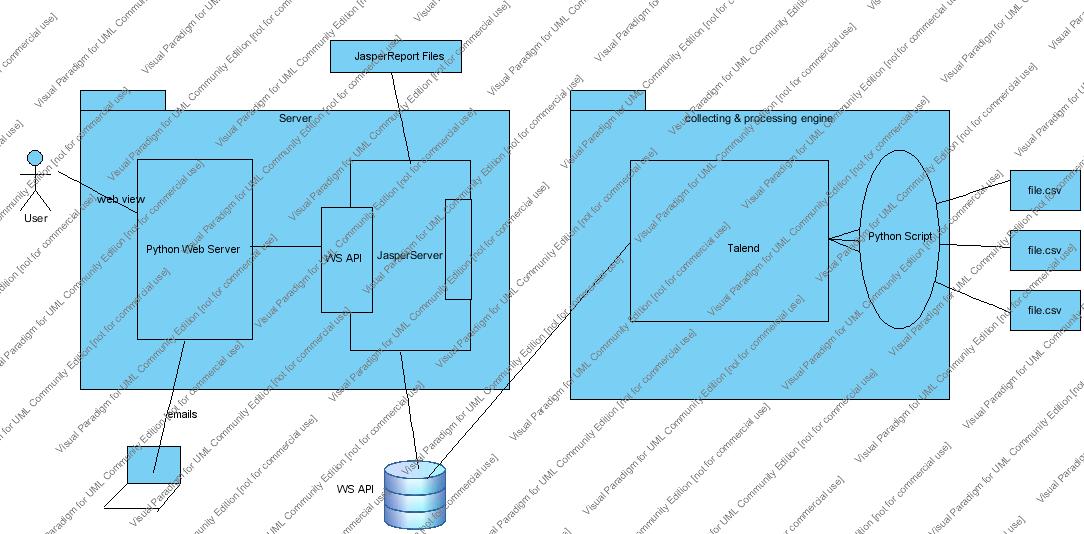
The APSAT itself is structured as 2 subsystems which are: back-end and front-end whose architecture is depicted by the simplified view below,
2.2. Back-end
Represented as the right rectangle zone of the figure above, its jobs are to work as the data collectors and processors from the log sources. That means this part is responsible for:
- Extracting data from the log file, supposedly situating in the PRE-Team’s servers
- Transforming into csv files for automatic processing
- Loading it into the corresponding databases
While each log file is a delimiter-separated text file whose contents are varied from one source to another, their format however has to follow the same form.
Where key and value might be missing (in this latter case simply a blank will be showed, while in the first case both will be absent).
These delimiter-seperated files will undergo a cleaning process where it will be transformed into ‘.csv’ files thanks to the python scripts. These scripts will read from configurations file which define the location of the log files, as well as the headers and the naming mapping.
See also
These pythons scripts will have to be put into the system schedules in order to be executed in a periodic manner. These scripts will go to the location defined in the config files and try to generated the output which will be consumed by Talend‘s jobs.
Talend is an Eclipse-based open source tool that provides data integration solutions through its concept of jobs. Each job is Java executable which is designed to perform a certain tasks, in our case taking the delimiter-separated files and then transform and load them into the databases periodically.
See also
2.3. Front-end
Represented as the left rectangle in the figure above, its responsibilities are to produce the visual reports from the database upson users’ requests. As mentioned earlier, there are basically 3 types of reports 2 of whom are fully or partially generated by the JasperReport powered engine. The real-time, however, is generated by the amchart javascript library and will be accessed via a django-powered web site.
This web site is exposed directly to users and aims to provide an easy and intuitive interface to work with the reports: create a new charts, download an existing one or request a new schedule for the aggregate ones...
See also